Cell renderer
Works anywhere OpenTUI works.
           ╭────────
     -b ± √ b² - 4ac
x = ─────────────────
2a- Native cell buffer
- Intrinsic Yoga dimensions
- Zero image-protocol dependency
Community package · pre-release docs
Render expressive LaTeX directly into OpenTUI's cell buffer—or switch to crisp, antialiased terminal graphics with the same component-shaped API.
bun add opentui-math @opentui/coreReserved package name. The command becomes live with the first npm release.
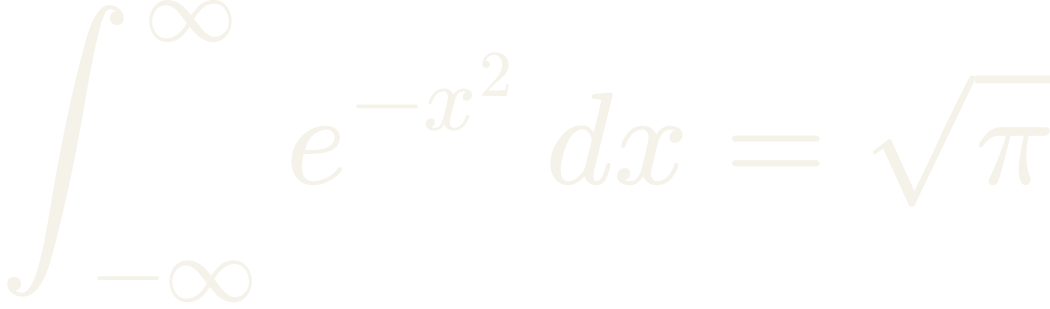
\int_{-\infty}^{\infty} e^{-x^2}\,dx = \sqrt{\pi}Baseline-aware Unicode output in every terminal.
MathJax curves and spacing where images are supported.
Coalesced deltas without parse-error flicker.
Renderers
Start with the universal backend, opt into terminal graphics, or export an image without running a TUI.
Works anywhere OpenTUI works.
╭────────
-b ± √ b² - 4ac
x = ─────────────────
2aBrowser-quality curves in the terminal.
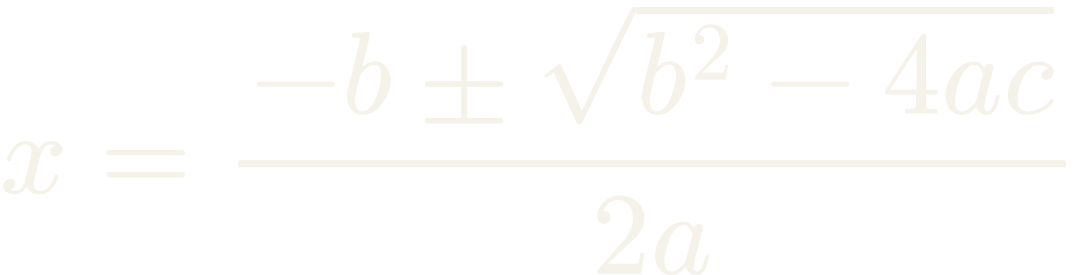
Use the same graphics engine for documentation, snapshots, previews, and custom composition.
import {
  renderLatexToPng,
  renderLatexToSvg,
} from "opentui-math/graphics"

const svg = await renderLatexToSvg(String.raw`E = mc^2`)
const { png, width, height } = await renderLatexToPng(
  String.raw`E = mc^2`,
  { fontSize: 48, pixelRatio: 2 },
)Quick start
The component measures itself, joins Yoga layout, and repaints whenever its content changes.
import { createCliRenderer } from "@opentui/core"
import { LatexRenderable } from "opentui-math"

const renderer = await createCliRenderer()
const formula = new LatexRenderable(renderer, {
  content: String.raw`x = \frac{-b \pm \sqrt{b^2 - 4ac}}{2a}`,
  foregroundColor: "#cdd6f4",
  displayMode: true,
})

renderer.root.add(formula)Set graphicsMode: "auto" on GraphicalLatexRenderable when you want high-resolution output with a transparent cell fallback.
Examples
These assets are generated by opentui-math's MathJax and resvg graphics backend—not browser-rendered approximations.
\int_{-\infty}^{\infty} e^{-x^2}\,dx = \sqrt{\pi}x = \frac{-b \pm \sqrt{b^2 - 4ac}}{2a}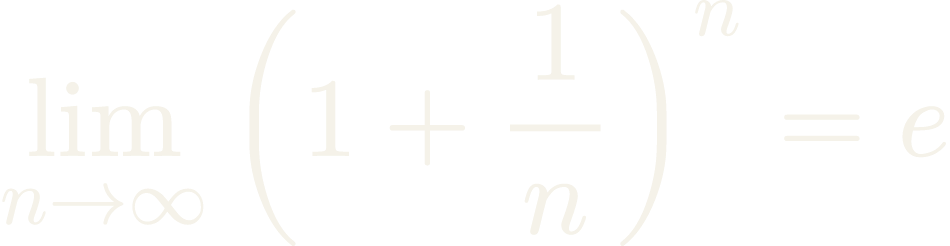
\lim_{n \to \infty}(1+\frac{1}{n})^n=eStreaming
AI output rarely stops at a valid LaTeX boundary. The stream controller batches deltas, validates prefixes, and commits only the frame you intend.

Generated from the package's graphics backend. The left side is the untouched accumulator; the right side is a temporary, structurally repaired preview.
Keep the last valid formula while a new prefix is incomplete.
Forward incomplete text to a renderable configured with source fallback.
Temporarily close groups and environments without mutating the stream.
import {
  completeLatexPrefix,
  GraphicalLatexRenderable,
  LatexStreamController,
} from "opentui-math/graphics"

const formula = new GraphicalLatexRenderable(renderer, {
  content: "",
  fallback: "source",
  graphicsMode: "auto",
})

const stream = new LatexStreamController(formula, {
  updateIntervalMs: 80,
  validationOptions: { strict: true },
  preview: completeLatexPrefix,
})

for await (const delta of latexDeltas) stream.append(delta)
await stream.finish()Frameworks
Use the imperative renderable directly or register one intrinsic element for your preferred reconciler.
import { createCliRenderer } from "@opentui/core"
import { LatexRenderable } from "opentui-math"

const renderer = await createCliRenderer()
const formula = new LatexRenderable(renderer, {
  content: String.raw`x = \frac{-b \pm \sqrt{b^2 - 4ac}}{2a}`,
  foregroundColor: "#cdd6f4",
  displayMode: true,
})

renderer.root.add(formula)Reference
The common path stays compact; graphics and streaming add focused controls only when you need them.
content""foregroundColor#e8e8f0displayModetruefallback"message"graphicsMode"auto"fontSize32pixelRatio1graphicsZIndex1updateIntervalMs75incompletePolicy"retain"previewnonemaxBufferLength100000Package map
| Entry point | Exports |
|---|---|
opentui-math | Cell renderable, pure renderer, parser, stream controller |
opentui-math/graphics | Kitty renderable, SVG/PNG output, graphics streaming |
opentui-math/react | Register the React <latex> intrinsic element |
opentui-math/solid | Register the Solid <latex> intrinsic element |
opentui-math/graphics/react | Register the React <latexImage> element |
opentui-math/graphics/solid | Register the Solid <latexImage> element |
Syntax & runtime
The cell backend handles the syntax that matters for terminal math. The graphics backend accepts the TeX input supported by MathJax.
Supported
Boundary
It does not compile documents, execute arbitrary macros, load packages, or render TikZ. Neither backend shells out to a TeX installation.
Use graphicsMode: "auto". A Kitty-compatible terminal gets the raster frame; unsupported terminals and blocked multiplexers get the same formula through the universal cell renderer. Bun is the recommended runtime for OpenTUI applications.